 Knowledge Center
Technical Sharing
Film Label Ink Adhesion Problems
When ink flakes, rubs off or beads up on film labels, the root cause is almost always surface energy, not the press settings.
Quick Answer
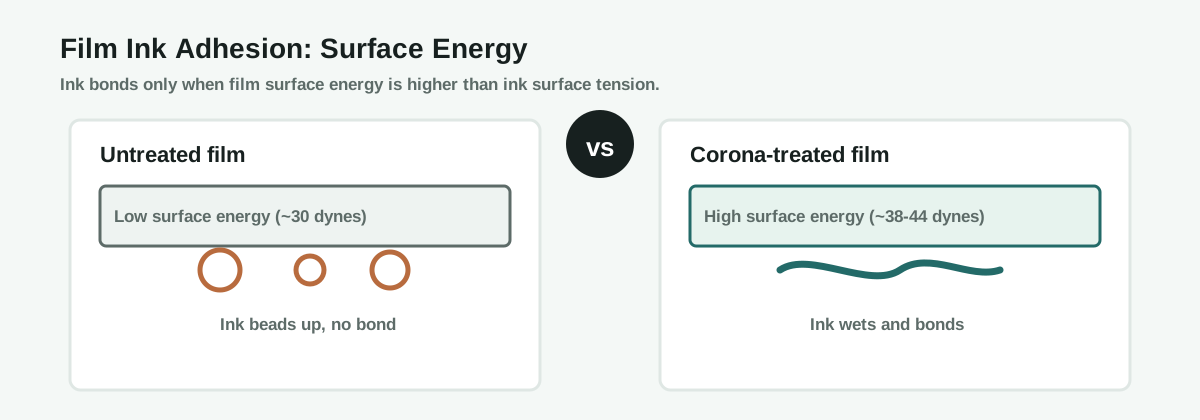
Ink does not stick to film labels because the film surface energy is too low for the ink to wet and bond. Untreated PP and BOPP sit around 29 to 31 dynes per centimeter, while most inks need the substrate surface energy to be clearly higher than the ink surface tension. The fix is usually corona or plasma treatment to raise the film to about 38 to 44 dynes, plus matching the ink system to the film.
The Problem
Film labels can show ink that flakes off after drying, rubs off in handling, or beads up and refuses to form a solid print. This appears most often on PP, PE, PET and BOPP films, and less often on paper, which absorbs ink and hides the same surface problem.
Material Analysis
- Film is non-porous: unlike paper, film does not absorb ink, so the bond is only surface adhesion, not penetration.
- Low surface energy: untreated PP and BOPP are roughly 29 to 31 dynes/cm and PET around 36 to 38, too low for many inks.
- Slip agents: additives that reduce film friction migrate to the surface over time and further lower surface energy.
- Treatment decay: a corona-treated film slowly reverts, so treatment measured at the supplier may be gone by press time.
Root-Cause Principle
Wetting and surface tension
For ink to wet and bond, the surface energy of the film must be higher than the surface tension of the ink. When the film energy is too low, the ink beads up instead of spreading, and the cured or dried ink has no mechanical or chemical anchor, so it flakes or rubs off.
Corona and plasma treatment oxidize the film surface, creating polar groups such as hydroxyl and carbonyl. These polar groups raise surface energy and provide chemical bonding sites for the ink. The treatment must be strong enough to reach the target dyne level and fresh enough to still be there at printing.
How to Diagnose
- Measure the film with dyne test pens before printing, not only from the supplier data.
- Check whether the defect is beading (wetting failure) or flaking after drying (bond failure).
- Test the same ink on paper to confirm the ink itself is not the problem.
- Check film age and storage, because slip agents and treatment decay over time.
Ink Adhesion Mechanism
Solutions
Always verify the treated dyne level at the press. A supplier value does not guarantee the film is still printable after storage and handling.
Prevention Checklist
- Confirm film surface energy before every job with dyne pens
- Corona or plasma treat inline where possible
- Match ink to the film and its surface energy
- Control film age, storage and slip agent migration
- Run a tape or rub test on first samples
FAQ
Why does ink stick to paper but not film?
Paper absorbs ink and provides mechanical anchoring, while film is non-porous and relies only on surface adhesion, so low surface energy stops the bond.
What dyne level do film labels need for printing?
Most film labels print reliably around 38 to 44 dynes, but the exact target depends on the ink and the film, so verify with dyne test pens.
Why did the film pass treatment at the supplier but fail at the press?
Corona treatment decays over time and slip agents migrate, so the treatment measured earlier may no longer be present at printing.
Does corona treatment damage the label material?
Correctly dosed corona or plasma treatment only modifies the surface. Too much energy can damage film, so match the dose to the material.
What information should I send before asking for help?
Send the film type, ink system, whether the defect is beading or flaking, the measured dyne level and the rub test result.
Ask an Engineer
Still getting ink adhesion failure on your film labels?
Send us your film type, ink system, measured dyne level and the exact defect. MWELLPACK can help you diagnose and fix the problem.
Related Articles
Related Machines
Flexo Printing Machine
Prints film labels where surface treatment and ink match decide adhesion.
View machine guideInkjet Machine for Labels
Digital printing where ink chemistry and coating drive film adhesion.
View machine guideDigital Label Finishing Machine
Finishes printed film labels with lamination, die cutting and rewinding.
View machine guide